Perfex CRM ships with support tickets, but no real-time chat. So when your team wants to message each other, talk to clients inside a project, or add live support, you need a module. The trouble is that the chat modules on the market solve very different problems — and pick the wrong one and you end up paying a monthly cloud fee or sending your data to a third party you didn't need.
We develop CRM Chat Pro, one of the modules in this comparison. We will be upfront about that — and honest about where a competitor is the better fit, especially if you need an AI chatbot, video calls, or WhatsApp. This is a genuine comparison, not a marketing piece disguised as a review.
Looking for AI or workflow modules instead? This article compares chat modules. For AI assistants see Best Perfex CRM AI Modules 2026, and for automation see Best Perfex CRM Workflow Automation Modules 2026.
The questions that decide it: Is the chat for your team and clients inside the CRM, or for external customer support across channels like WhatsApp? Does it run self-hosted, or depend on a paid cloud (Pusher) or a third-party provider? And do you need extras like an AI chatbot or voice/video calls? Keep those in mind — they explain every recommendation below.
The Chat Module Landscape for Perfex CRM
As of June 2026, the Perfex chat modules fall into three categories:
- Native self-hosted messaging — team, client and project chat that runs entirely on your own server, no external service required. (CRM Chat Pro)
- All-in-one communication suites — staff + client chat plus AI chatbots, voice/video calls and support panels, typically built on Pusher's paid WebSocket cloud. (i-Dev Perfex CRM Chat)
- Omnichannel & external-provider tools — route customer conversations through WhatsApp/Telegram/Email or plug an external live-chat service into Perfex. (PulseChat, themesic Live Chat, Support Board)
When choosing, ask: Who is the chat for (team, clients, or website visitors)? Does it run on your server or in someone else's cloud? Is there a recurring fee (Pusher, AI tokens, a SaaS plan)? And does it integrate with your projects and tickets, or sit beside the CRM?
Top Chat Modules Compared
1. CRM Chat Pro (Custom PerfexCRM) — Best for Native, Self-Hosted Team & Client Chat
Disclosure: This is our module. We built it, we sell it, and we will be honest about both its strengths and its limits.
| Price | €59 — one-time license (sold via custom-perfexcrm.com, not CodeCanyon) |
| Type | Native self-hosted team + client + project chat |
| Real-time | Hybrid: SSE (~1s) + badge-polling fallback + optional Pusher — no Pusher account required |
| Requires | Perfex CRM 3.4+, PHP 8.1+ — no external services |
| Version | 1.x (actively maintained, 2026) |
What it does: CRM Chat Pro adds a complete real-time messaging system directly into Perfex — for your team and your clients — with zero external accounts and no monthly fees:
- Real-time messaging without external services — a 3-tier hybrid (Server-Sent Events as primary, badge-polling fallback, optional Pusher turbo). It works out of the box on standard PHP hosting; no Pusher account needed.
- Project channels — every project gets a dedicated channel whose members auto-sync with the project team, and you can invite client contacts.
- Client portal chat — clients message your team directly from the Perfex customer portal.
- Direct & group messages, emoji reactions, replies/threads, @mentions, typing & presence indicators, audio messages, and file/media sharing.
- Convert chat to ticket — turn a discussion into a Perfex support ticket in one click, with context preserved.
- Draggable floating widget on every admin page (position saved across reloads), Flavor dark-mode integration, and a fully mobile-responsive UI from 390px.
- 6 granular permissions, 17 admin settings, and configurable message retention/cleanup.
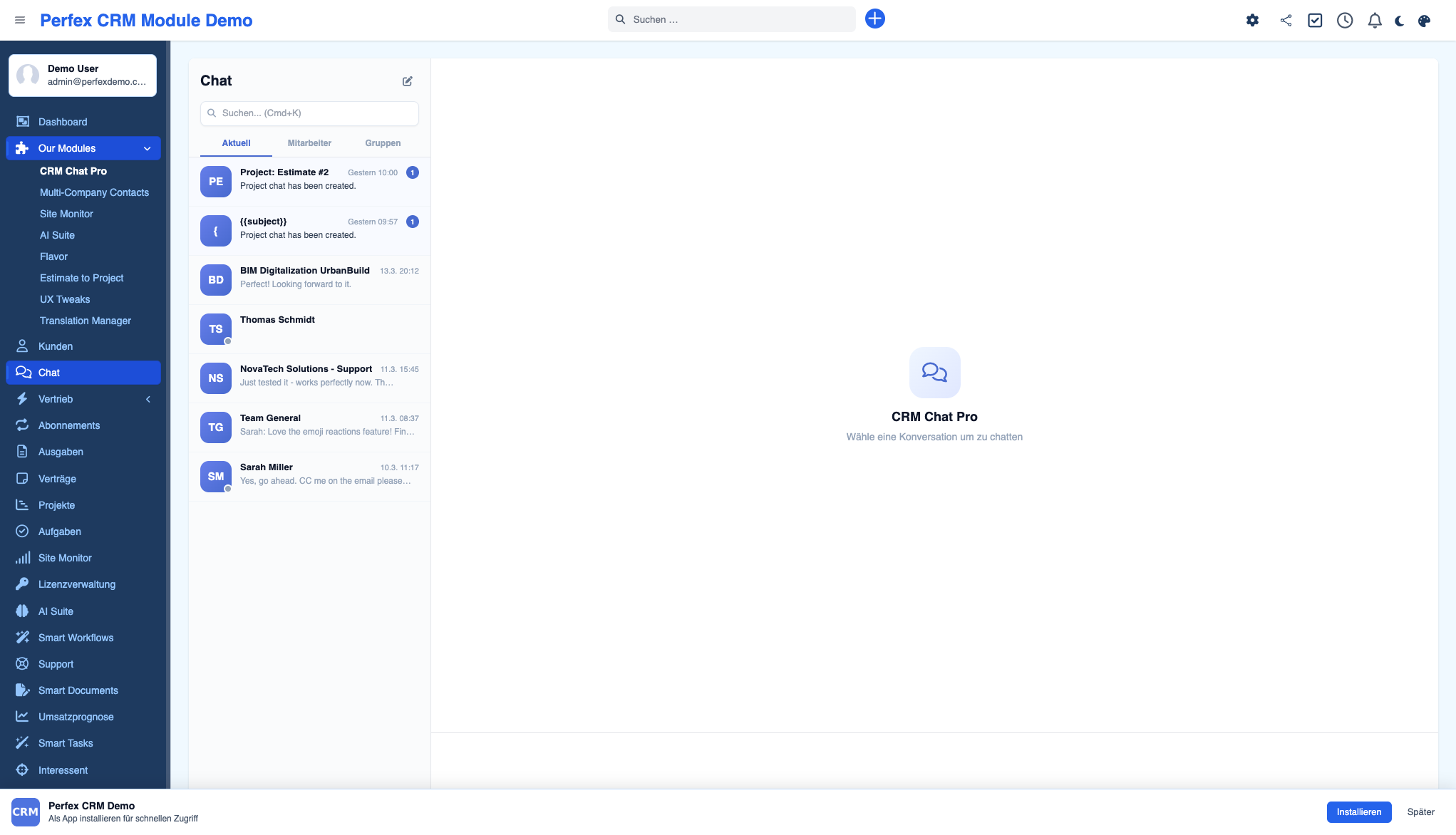
Where it shines: It is the native, self-hosted choice — all data stays on your server (GDPR-friendly), there is no monthly Pusher fee, and it integrates deeply with Perfex (project channels, client portal, convert-to-ticket, Flavor dark mode). One-time price, no recurring cost.
Where it falls short: It is built for team and client messaging, not external customer support. It has no AI chatbot, no WebRTC voice/video calls, no omnichannel inbox (WhatsApp/Telegram), and no website-visitor live-chat widget or CSAT analytics. If you need any of those, see i-Dev or PulseChat below.

2. Perfex CRM Chat (i-Dev) — Best All-in-One Communication Suite
| Price | On CodeCanyon (one-time; check current price) |
| Type | All-in-one staff + client chat suite |
| Real-time | Pusher WebSockets (Pusher account required) |
| Notable | v2.0.0 adds AI chatbot + WebRTC calls |
What it does: The most feature-broad chat add-on for Perfex — real-time staff chat, client messaging, group conversations, an AI-powered chatbot (RAG answers from your own content, with lead capture), WebRTC voice and video calls, a live support panel, and CSAT analytics, all in one module built on Pusher WebSockets.
Where it shines: If you want everything in a single module — especially an AI chatbot and voice/video calls — this is the broadest option in the Perfex ecosystem. Long-established and popular.
Where it falls short: It is built on Pusher, so real-time delivery depends on Pusher's cloud (an account, and a paid plan at scale), and conversation data passes through Pusher's servers. The AI chatbot consumes your own AI tokens. If you want a fully self-hosted, no-external-service option, that is exactly where CRM Chat Pro differs.
3. PulseChat (themesic) — Best for Omnichannel AI Customer Service
| Price | On CodeCanyon (one-time; check current price) + AI tokens / channel fees |
| Type | Omnichannel AI customer-support inbox |
| AI | OpenAI (ChatGPT) + Anthropic (Claude) |
What it does: Turns Perfex into an AI-powered omnichannel inbox — answer WhatsApp, Telegram, Email, SMS, Slack and more from one screen, with AI auto-replies, summaries, translations, and tone rewrites, plus automation rules for routing and unified CRM context per conversation.
Where it shines: The right tool if your job is external customer support across channels, especially WhatsApp and Telegram, with AI drafting replies. Nothing else in this list does omnichannel.
Where it falls short: It is a customer-support inbox, not an internal team/project chat. It relies on external messaging channels and AI providers (recurring cost and data leaving the CRM). For internal staff chat, project channels, and client-portal collaboration, CRM Chat Pro is the better fit — the two solve different problems.
4. Live Chat Module (themesic) — Best for Plugging In an External Provider
| Price | On CodeCanyon (one-time) + your live-chat provider's plan |
| Type | Connector for external live-chat services |
What it does: Embeds an external live-chat service — it supports 2,000+ providers like Olark, LiveChat, LivePerson, and Intercom — into the Perfex admin and customer areas.
Where it shines: Perfect if you already use (or want) a dedicated website-visitor live-chat provider and just need it inside Perfex.
Where it falls short: It is a connector, not chat itself — the actual chat (and its monthly cost, and your data) lives with the third-party provider. No native team messaging, project channels, or convert-to-ticket.
5. Chat & Tickets for Support Board (Schiocco) — External Support-Board App
This integrates the external Support Board platform with Perfex, letting customers chat with staff in real time and including a smart bot for automated answers. It is a capable support-desk chat with a bot, but it is built around the separate Support Board product rather than being native to Perfex — so, like the connector above, the chat engine and data live outside your CRM. Listed on CodeCanyon.
Feature Comparison Table
| Capability | CRM Chat Pro | i-Dev Chat | PulseChat | themesic Live Chat |
|---|---|---|---|---|
| Runs self-hosted (no external service) | Yes | No (Pusher) | No (channels + AI cloud) | No (external provider) |
| No recurring fee | Yes | Pusher at scale | AI/channel fees | Provider plan |
| Internal team / staff chat | Yes | Yes | Limited | No |
| Project channels (auto-sync) | Yes | n/a | n/a | No |
| Client portal chat | Yes | Yes | Via channels | Via provider |
| Convert chat → ticket | Yes | n/a | n/a | No |
| AI chatbot | No | Yes (RAG) | Yes (auto-reply) | Provider-dependent |
| Voice / video calls | No | Yes (WebRTC) | No | Provider-dependent |
| Omnichannel (WhatsApp/Telegram) | No | No | Yes | Provider-dependent |
| GDPR: data stays on your server | Yes | No (Pusher) | No (external) | No (external) |
| Price | €59 one-time | CodeCanyon | CodeCanyon + fees | CodeCanyon + plan |
"n/a" means the capability is not advertised or could not be verified from the vendor's listing. Competitor pricing is one-time on CodeCanyon but was not published in our sources — check the current listing. Verified June 2026.
Which Module Is Right for You?
| Native team, client & project chat inside Perfex, self-hosted, no monthly fee | CRM Chat Pro — GDPR-friendly, project channels, convert-to-ticket. |
| An all-in-one suite with an AI chatbot and voice/video calls | i-Dev Perfex CRM Chat — accepting the Pusher dependency. |
| External customer support across WhatsApp, Telegram, Email with AI replies | PulseChat (themesic). |
| Plug an existing live-chat provider (Olark, Intercom, LiveChat) into Perfex | themesic Live Chat module. |
| Keep all chat data on your own server for compliance | CRM Chat Pro — 100% self-hosted, no external API calls. |
What About Combining Modules?
These modules use Perfex's hook system, and several solve genuinely different jobs, so combining can make sense:
- CRM Chat Pro + PulseChat — CRM Chat Pro for internal team and client-portal/project messaging, PulseChat for external omnichannel customer support. Different audiences, no overlap.
- CRM Chat Pro + Perfex tickets — use convert-to-ticket so a chat that becomes a real issue lands in your existing support workflow.
- Avoid running two internal-chat engines at once (e.g. CRM Chat Pro and i-Dev) — they cover the same job, and your team should have one place to message.
Standard caveat: test on a staging copy first, especially when two modules hook the same areas.
Frequently Asked Questions
What is the best chat module for Perfex CRM?
It depends on who the chat is for. For native, self-hosted team, client and project messaging with no monthly fees, CRM Chat Pro is the best fit (€59 one-time, GDPR-friendly, with project channels and convert-to-ticket). For an all-in-one suite with an AI chatbot and WebRTC voice/video calls, i-Dev's Perfex CRM Chat is the broadest option, though it depends on Pusher. For external customer support across WhatsApp, Telegram and Email with AI replies, PulseChat is the right tool.
Does Perfex CRM have built-in chat?
No. Perfex CRM core includes support tickets but no real-time chat for staff or clients. To add live messaging — team chat, client-portal chat, or website live chat — you need a dedicated chat module.
Does CRM Chat Pro require Pusher or any external service?
No. CRM Chat Pro is 100% self-hosted and works out of the box using Server-Sent Events (SSE) with about one-second latency, plus a badge-polling fallback. If you already have Pusher configured in Perfex, it will use WebSockets automatically — but a Pusher account is never required.
Is CRM Chat Pro GDPR compliant?
Yes. All chat data stays on your own server with no external API calls for core functionality. Messages use soft-delete for audit trails, and you can configure automatic message cleanup after a set number of days. This is a key difference from Pusher-based or cloud-channel competitors, where conversation data passes through third-party servers.
Can clients chat with my team from the portal?
Yes. With CRM Chat Pro, clients message your team directly from the Perfex customer portal, including project-specific conversations, file sharing, and real-time updates — all inside their portal view.
CRM Chat Pro vs. i-Dev Perfex CRM Chat — which should I choose?
i-Dev's module is broader — it adds an AI chatbot, WebRTC voice/video calls, and CSAT analytics — but it is built on Pusher, so real-time delivery depends on Pusher's cloud and your data passes through it. CRM Chat Pro is fully self-hosted with no monthly fee, deep Perfex integration (project channels, client portal, convert-to-ticket) and GDPR-friendly data handling, but it has no AI chatbot or video calls. Choose i-Dev for an AI bot and calls; choose CRM Chat Pro for native, self-hosted team and client chat.
How much does CRM Chat Pro cost?
CRM Chat Pro is €59 as a one-time license, with no recurring fees and no required external services. It runs on Perfex CRM 3.4+ and PHP 8.1+.
The Bottom Line
Perfex CRM chat comes down to who you are talking to and where the data should live. Our honest take:
- For native team, client and project chat — self-hosted, GDPR-friendly, no monthly fee — CRM Chat Pro is the best fit, with project channels and convert-to-ticket built in.
- For an all-in-one suite with an AI chatbot and video calls — i-Dev Perfex CRM Chat, accepting the Pusher dependency.
- For omnichannel customer support (WhatsApp, Telegram, Email + AI) — PulseChat.
- For an external live-chat provider inside Perfex — the themesic Live Chat connector.
Want to see native, self-hosted chat in action? Try the live demo — no signup required. Or browse all our modules to find the right combination.