If you run client websites, you want to know they are down before your client calls. Perfex CRM has no built-in uptime monitoring, so agencies and IT teams reach for a module to track sites right inside the CRM they already use for clients, projects, and tickets. The modules that do this differ in one big way: what they monitor, and where the data lives.
We develop Site Monitor, one of the modules in this comparison. We will be upfront about that — and honest about where a competitor is the better fit, especially if you need to monitor any website (not just WordPress) or want public status pages. This is a genuine comparison, not a marketing piece disguised as a review.
Looking at modules more broadly? This article focuses on website monitoring. For the full catalog (AI, chat, automation) see Best Perfex CRM AI Modules 2026 or all Perfex CRM modules.
The questions that decide it: Do you need to monitor any website, or specifically WordPress sites? Do you want public status pages for clients? And should the data stay self-hosted in your CRM, or is an external service acceptable? Keep those in mind — they explain every recommendation below.
The Website Monitoring Landscape for Perfex CRM
As of June 2026, the options for monitoring websites from Perfex fall into a few groups:
- Native uptime monitoring modules — check sites on a schedule and store the data in your own Perfex database. (Site Monitor — WordPress-focused; Website Uptime Monitor by Hopperstack — any site)
- Security & monitoring toolsets — combine monitoring with security hardening for the CRM itself. (PerfShield)
- Maintenance management modules — track maintenance work and schedules for client sites rather than uptime. (Website Maintenance Management)
- External monitoring services — UptimeRobot, Pingdom and similar, used outside the CRM (sometimes linked in via webhooks).
When choosing, ask: What does it actually check (any URL, or WordPress specifically)? Where is the data stored (your server, or a third party)? Does it offer client-facing status pages? And does it run on your existing Perfex cron, or need an external service?
Top Website Monitoring Modules Compared
1. Site Monitor (Custom PerfexCRM) — Best for Simple, Self-Hosted WordPress Monitoring
Disclosure: This is our module. We built it, we sell it, and we will be honest about both its strengths and its limits.
| Price | €39 — one-time license (sold via custom-perfexcrm.com) |
| Type | Native uptime monitoring, WordPress-focused |
| Data | Stored in your Perfex CRM database — no external service |
| Requires | Perfex CRM 3.x, PHP 7.4+, the Perfex cron |
What it does: Site Monitor watches your WordPress websites from inside Perfex and alerts you when one goes down:
- WordPress monitoring — checks your WordPress sites at a configurable interval (from every 1 to 60 minutes) and notifies you on downtime.
- Response-time tracking — records response times over time so you can spot performance degradation before it becomes an outage.
- Dashboard widget — the status of all monitored sites at a glance on your CRM dashboard.
- Downtime history — a full incident log with duration and status codes for analysis.
- Multi-site support — monitor as many WordPress sites as you need from one place.
- Email alerts — notifications when a site goes down and again when it recovers, including status code and response time.
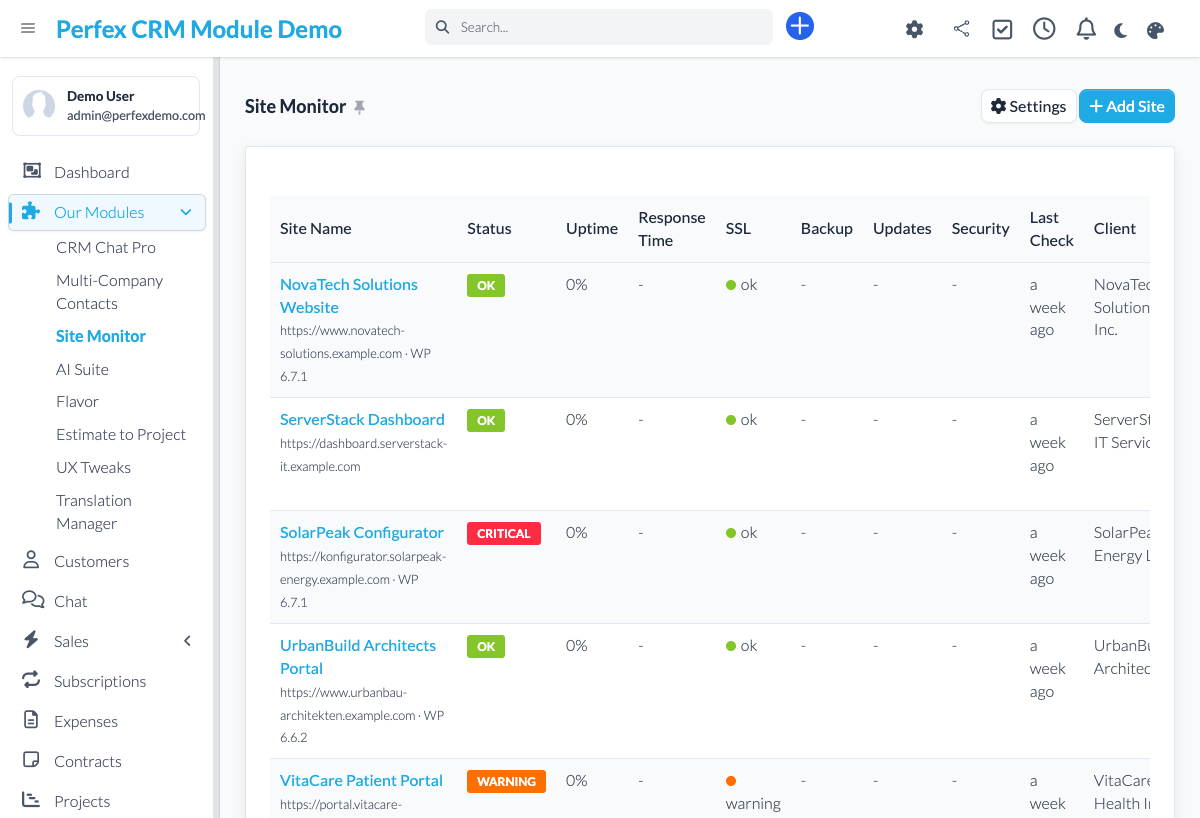
Where it shines: It is the simple, self-hosted choice — all monitoring data stays in your own Perfex database (no third-party service, you own your uptime history), it runs on your existing Perfex cron, and it is purpose-built for WordPress sites at a one-time €39. No accounts, no monthly fees.
Where it falls short: It is WordPress-focused — if you need to monitor any kind of website (APIs, non-WordPress apps), or want client-facing public status pages and keyword-in-response checks, the Hopperstack module below is the broader tool. Site Monitor keeps things simple on purpose.
2. Website Uptime Monitor (Hopperstack) — Best for Any Website + Status Pages
| Price | On CodeCanyon (one-time; check current price) |
| Type | Native uptime monitoring, any website |
| Data | Stored in Perfex; adds public status pages |
What it does: Monitors unlimited websites of any type with independent configurations, optional keyword verification in the response (for full-page integrity), a real-time status dashboard with response times, interactive uptime/performance charts, and failed-check tracking. Each monitored site can get its own responsive public status page with auto-refresh.
Where it shines: The broader, more feature-rich choice — it monitors any URL (not just WordPress), and its public status pages and keyword verification make it ideal for agencies, hosting providers, and IT teams that want client-facing transparency.
Where it falls short: With more features comes more setup, and it is a general tool rather than WordPress-specific. If all you run is WordPress and you want something simple and self-hosted at a low one-time price, Site Monitor is the leaner fit.
3. Website Maintenance Management (zegapps) — For Maintenance Work, Not Uptime
| Price | On CodeCanyon (one-time) |
| Type | Maintenance scheduling / management |
What it does: Manages website maintenance work for clients — plans, schedules, and tracking — rather than live uptime checks. It is a project/maintenance management tool, not an uptime monitor.
Where it fits: Choose it if your need is organizing and billing recurring maintenance work for client sites. For knowing whether a site is up right now, pair it with (or choose) a real uptime monitor.
4. PerfShield (themesic) — Security + Monitoring Toolset
PerfShield is a security and monitoring toolset focused on hardening the Perfex CRM installation itself (security checks, monitoring of the CRM), rather than tracking external client websites' uptime. It is worth knowing if your priority is securing your own Perfex instance. Listed on CodeCanyon.
Feature Comparison Table
| Capability | Site Monitor | Hopperstack Uptime Monitor |
|---|---|---|
| Monitors WordPress sites | Yes (purpose-built) | Yes |
| Monitors any website / URL | WordPress-focused | Yes |
| Data self-hosted in Perfex DB | Yes | Yes |
| No external service / monthly fee | Yes | Yes (one-time license) |
| Response-time tracking | Yes | Yes |
| Downtime / incident history | Yes | Yes |
| Dashboard widget | Yes | Dashboard |
| Public status pages | No | Yes |
| Keyword-in-response check | n/a | Yes |
| Email downtime alerts | Yes | Yes |
| Price | €39 one-time | CodeCanyon |
"n/a" means the capability is not advertised or could not be verified from the vendor's listing. Competitor pricing is one-time on CodeCanyon but was not published in our sources — check the current listing. Verified June 2026.
Which Module Is Right for You?
| Simple, self-hosted uptime monitoring for WordPress sites, low one-time price | Site Monitor — native, data in your CRM, €39. |
| Monitor any website and offer clients public status pages | Website Uptime Monitor (Hopperstack) — broader, with keyword checks. |
| Organize and bill recurring maintenance work for client sites | Website Maintenance Management (zegapps). |
| Harden and monitor your own Perfex CRM installation | PerfShield (themesic). |
| Keep all monitoring data on your own server (no third party) | Site Monitor or Hopperstack — both store data in Perfex. |
What About External Services (UptimeRobot, Pingdom)?
External services like UptimeRobot or Pingdom are capable and often have free tiers, but they live outside your CRM: you check a separate dashboard, the data sits with a third party, and tying alerts back to a client record means extra integration work. The advantage of a Perfex module is that uptime sits next to the client, project, and tickets it relates to — and the data stays on your server. If you already rely on an external service, you can keep it; a module is about keeping monitoring inside the CRM.
Frequently Asked Questions
What is the best website monitoring module for Perfex CRM?
It depends on what you monitor. For simple, self-hosted uptime monitoring of WordPress sites at a low one-time price, Site Monitor is the best fit (€39, data stored in your own Perfex database). For monitoring any website and offering clients public status pages with keyword verification, the Hopperstack Website Uptime Monitor is the broader choice. Both store data inside Perfex rather than a third-party service.
Does Perfex CRM have built-in uptime monitoring?
No. Perfex CRM core has no website or uptime monitoring. To track whether your sites are up — and keep that data next to your clients and projects — you need a dedicated monitoring module.
Does Site Monitor only work with WordPress?
Yes. Site Monitor is designed specifically for WordPress websites and checks WordPress-relevant endpoints. If you need to monitor non-WordPress sites, APIs, or any URL, choose a general uptime monitor like the Hopperstack module instead.
Where is the monitoring data stored?
With Site Monitor, all monitoring data is stored in your own Perfex CRM database — no external service is involved and you own your complete uptime history. This is a key difference from external services like UptimeRobot or Pingdom, where the data sits with a third party.
How often are sites checked, and how am I notified?
You configure the check interval per site, from every 1 minute to every 60 minutes, and Site Monitor relies on your Perfex cron to run checks on schedule. It sends email notifications when a site goes down and again when it recovers, including the status code and response time.
How much does Site Monitor cost?
Site Monitor is €39 as a one-time license, with no recurring fees and no external monitoring service. It runs on Perfex CRM 3.x and PHP 7.4+, using your existing Perfex cron job.
The Bottom Line
Monitoring inside Perfex keeps uptime next to the clients and projects it affects — and keeps the data on your server. Our honest take:
- For simple, self-hosted WordPress uptime monitoring — at a low one-time price — Site Monitor is the best fit.
- For monitoring any website with public status pages — the Hopperstack Website Uptime Monitor is the broader tool.
- For managing maintenance work — Website Maintenance Management; for securing your own CRM — PerfShield.
Want to see native, self-hosted monitoring in action? Try the live demo — no signup required. Or browse all our modules.