توثيق AI Suite
شرح بالفيديو
بفصول قابلة للنقر — انقر فصلاً للانتقال إليه مباشرة.
البدء
اتبع هذه الخطوات لتشغيل AI Suite.
تثبيت AI Suite الأساسي
ارفع ملف AI Suite المضغوط عبر الإعدادات > الإضافات > تثبيت إضافة جديدة. فعّل الإضافة وأدخل مفتاح الترخيص.

تكوين مزود الذكاء الاصطناعي
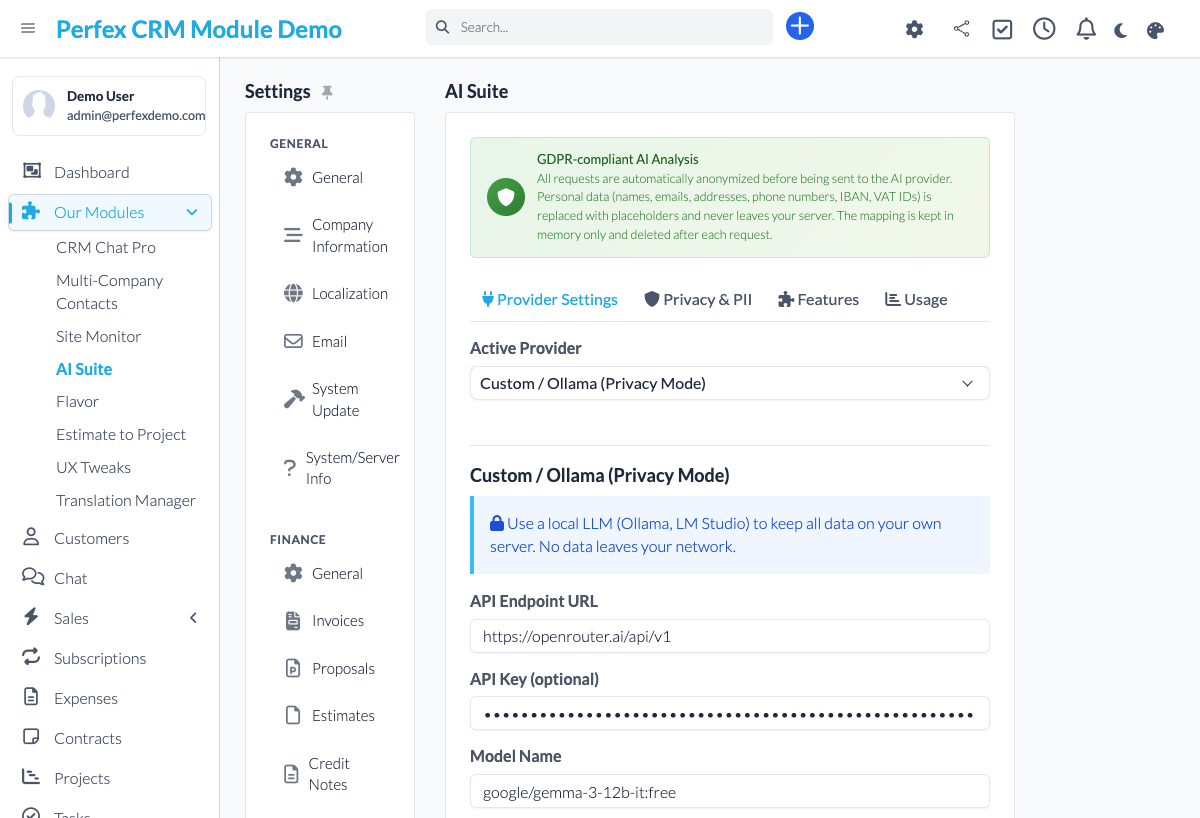
انتقل إلى الإعدادات > AI Suite > المزود. اختر مزود الذكاء الاصطناعي (OpenAI أو Claude أو Gemini أو Custom/OpenRouter) وأدخل مفتاح API واختر النموذج. للبدء مجاناً، اختر Custom (OpenRouter)، واضبط النموذج على nvidia/nemotron-3.5-lightning:free، وفعّل "Disable reasoning (for JSON tasks)".
تثبيت الإضافات الفرعية
ارفع وفعّل الإضافات الفرعية التي تحتاجها: AI Insights لـ Customer 360 وتقييم العملاء المحتملين، Revenue Forecast للتنبؤات، Smart Documents لصياغة العروض، أو Smart Tasks لترتيب أولويات المهام.
Try Customer 360 (AI Insights)
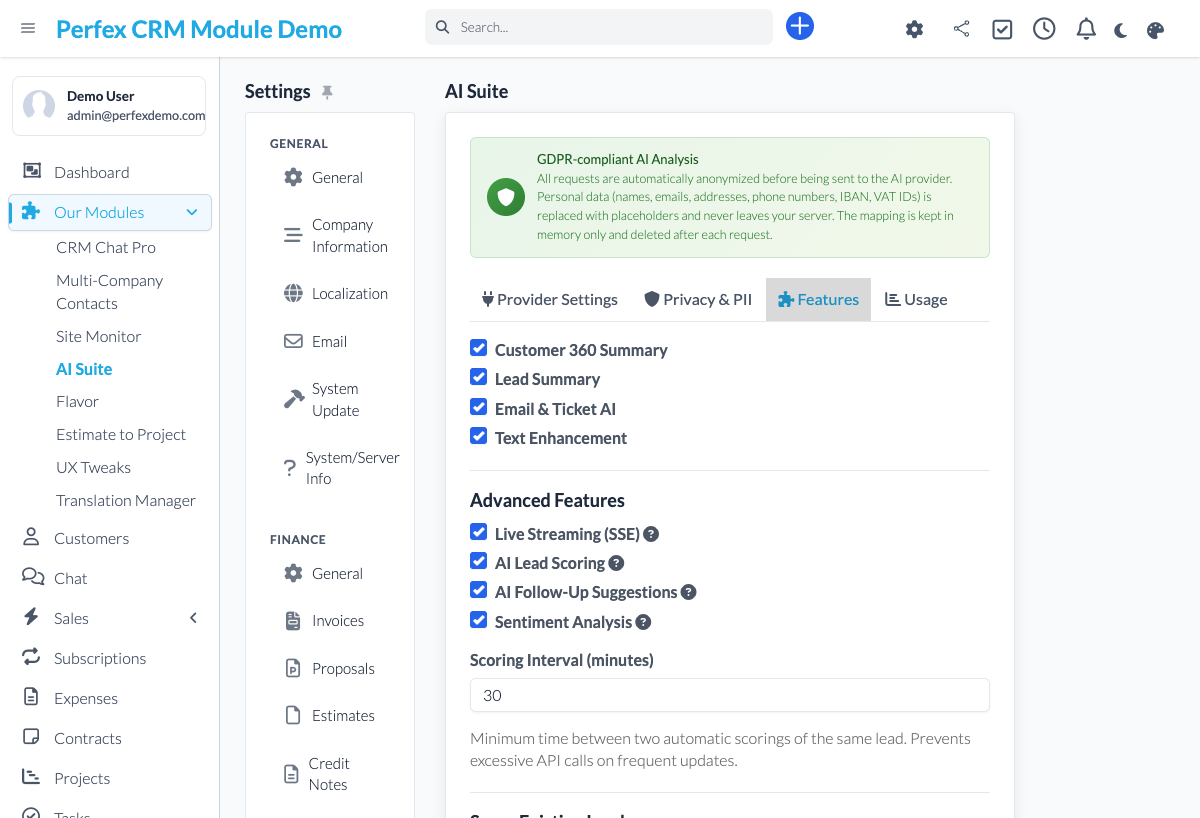
With the AI Insights add-on installed (included in the Starter bundle), open any client profile and click the AI tab. Click "Generate Analysis" to see a comprehensive Customer 360 with real-time streaming. The AI analyzes invoices, projects, tickets, and proposals to create actionable insights.
تحليل تذكرة
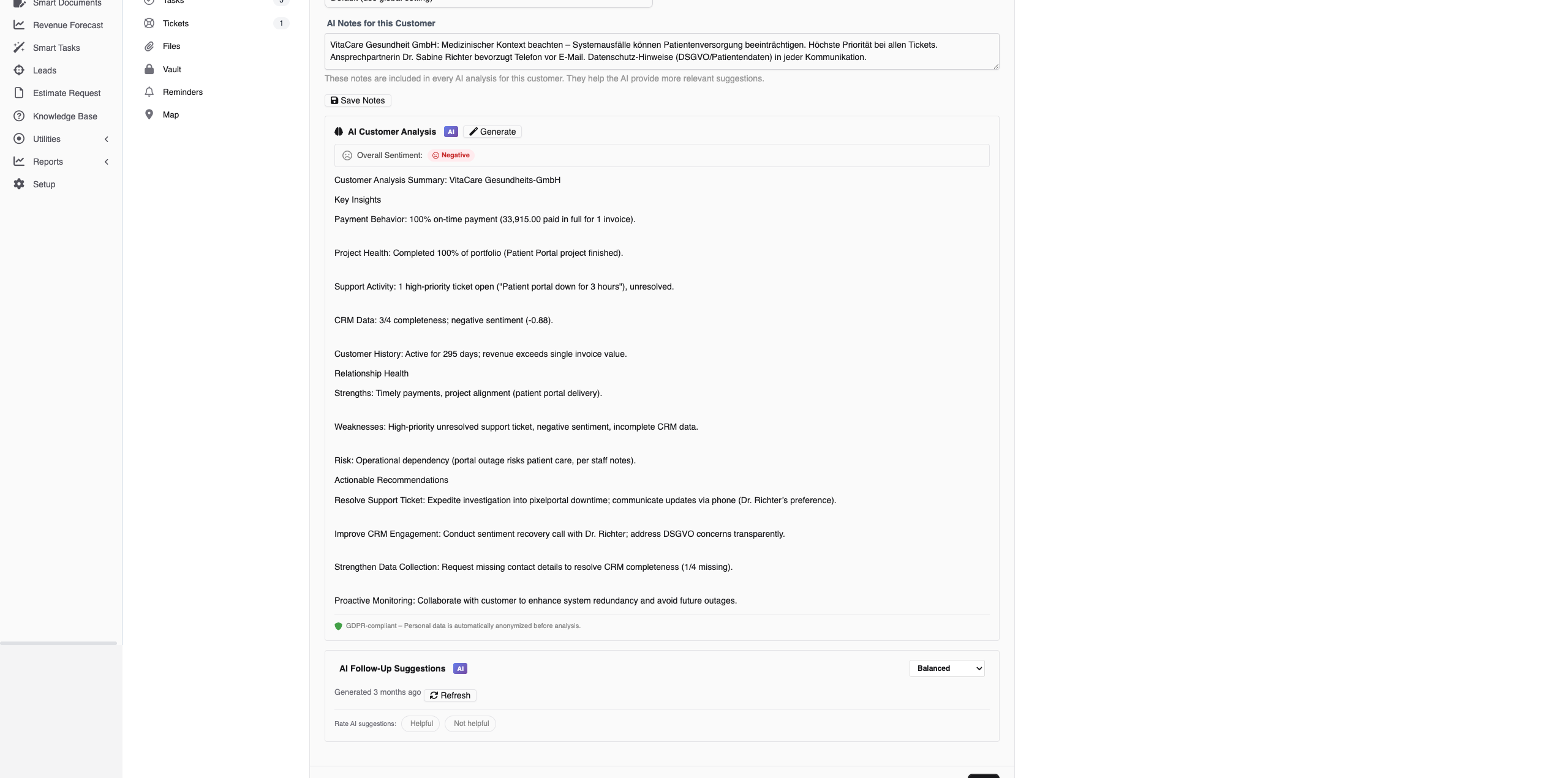
افتح تذكرة دعم واستخدم ميزات الذكاء الاصطناعي: التلخيص لنظرة عامة سريعة، والمشاعر لكشف المزاج، واقتراح الرد لصياغة رد بالذكاء الاصطناعي، أو إعادة الصياغة لتحسين ردك المكتوب.
تكوين توجيه النماذج (اختياري)
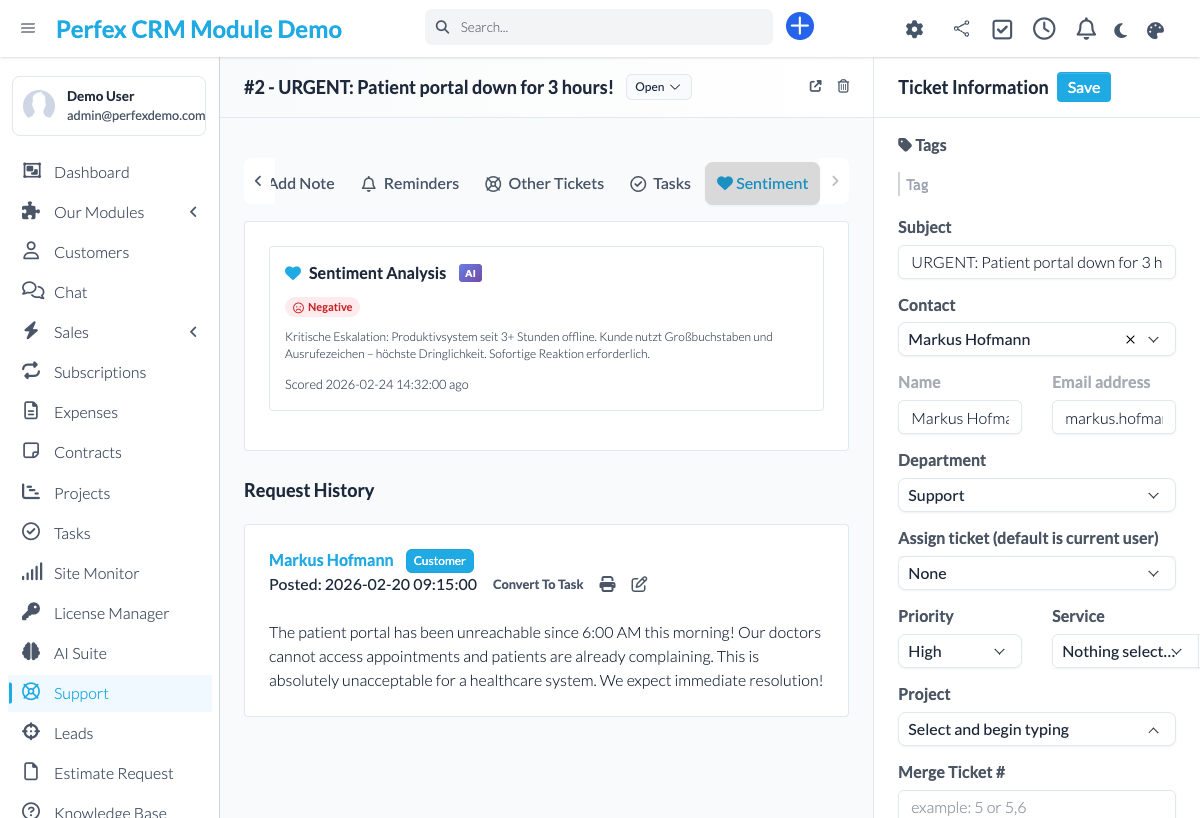
للإعدادات المتقدمة، انتقل إلى الإعدادات > AI Suite > الميزات لتعيين نماذج مختلفة لكل ميزة. استخدم نموذجاً سريعاً للمهام البسيطة (المشاعر والتقييم) ونموذجاً متميزاً للمهام المعقدة (Customer 360 والعروض).
Download Diagnostics Report
If you need support, go to the module admin page and click the "Download Diagnostics" link. This generates a JSON file with system info, PHP version, installed modules, and recent errors (secrets are automatically redacted). Upload this file when creating a support ticket at custom-perfexcrm.com/support/ for faster troubleshooting.

نصائح وحيل
احصل على أقصى استفادة من AI Suite مع هذه النصائح.
ابدأ مجاناً مع NVIDIA Nemotron
أنشئ حساب OpenRouter مجاني واستخدم نموذج NVIDIA Nemotron المجاني (nvidia/nemotron-3.5-lightning:free) مع تفعيل "Disable reasoning". تحصل على ذكاء اصطناعي قوي ومحترم للخصوصية لكل ميزة بدون تكلفة لكل رمز — مثالي للاختبار قبل الالتزام بمزود مدفوع.
استخدم إعدادات النبرة لكل عميل
حدد نبرات تواصل مختلفة لعملاء مختلفين. عميل شركة كبيرة قد يحتاج لغة رسمية بينما يفضل مؤسس شركة ناشئة لغة غير رسمية. انتقل إلى تبويب الذكاء الاصطناعي للعميل لتكوين النبرة والتعليمات المخصصة.
نماذج مختلفة، تكلفة أقل
ليست كل ميزة تحتاج النموذج الأغلى. استخدم نموذجاً سريعاً ومنخفض التكلفة (Gemini Flash) لتحليل المشاعر وتقييم العملاء المحتملين، واحتفظ بالنماذج المتميزة (Claude، GPT-4) لـ Customer 360 وتوليد العروض.
قيّم عملاءك المحتملين دفعة واحدة
استخدم ميزة التقييم الجماعي لتقييم جميع العملاء المحتملين غير المقيّمين دفعة واحدة. تظهر التقييمات كشارات ملونة على لوحة كانبان لترتيب الأولويات البصري الفوري.
البث الفوري لتغذية راجعة أسرع
يستخدم Customer 360 وملخص العملاء المحتملين البث الفوري. ترى استجابة الذكاء الاصطناعي تظهر رمزاً تلو الآخر، حتى تتمكن من البدء في قراءة الرؤى أثناء استمرار التحليل.
Use diagnostics for faster support
When creating a support ticket, download and attach the diagnostics report from your module settings. It contains system info, PHP version, database details, and recent errors — all with secrets automatically redacted. This helps resolve your issue much faster.
الأسئلة الشائعة
Is my data sent to external AI services?
Only to the AI provider you connect, using your own API key. Most AI actions run when you trigger them (e.g., analyzing a ticket or generating a Customer 360). With the AI Insights add-on, sentiment analysis runs automatically on new tickets, replies and notes, and lead scoring runs when a lead is created or changed. You can switch both off in the settings. Before any prompt leaves your server, AI Suite redacts personal data such as names, email addresses and phone numbers (on by default).
Can I use free AI models?
Yes - and at no per-token cost. With OpenRouter as your provider you can run every feature on free models. We recommend NVIDIA Nemotron (for example nvidia/nemotron-3.5-lightning:free) with the "Disable reasoning" option enabled - it is privacy-friendly, fast, and reliable for the JSON-based features. See our documentation for per-feature tips.
Does AI Suite work with Perfex CRM 3.x?
Yes. AI Suite is fully compatible with Perfex CRM 3.x and requires PHP 8.0 or higher. It is tested with every Perfex CRM release.
Which AI providers are supported?
AI Suite supports OpenAI (GPT-4o, GPT-4, o1), Anthropic Claude (Sonnet, Opus, Haiku), Google Gemini (2.5 Flash, Pro), and any OpenAI-compatible endpoint. This includes OpenRouter, which gives you access to 200+ models including free options.
What is Customer 360?
Customer 360 is a comprehensive AI analysis of each client. It examines invoices, projects, tickets, estimates, and proposals to generate insights about payment behavior, relationship health, revenue trends, risks, and actionable recommendations. Results stream in real time. Customer 360 is part of the AI Insights add-on and included in the Starter bundle.
How does per-feature model routing work?
You can assign different AI models to different features in Settings > AI Suite > Features. For example, use a fast cheap model for sentiment analysis, a mid-tier model for follow-up suggestions, and a premium model for Customer 360. You can even set different models per language.
How does the lead scoring work?
The AI analyzes lead data including source, status, communication history, and assigned value to generate a score from 0-100 with a hot/warm/cold label. Scores appear as badges on lead kanban cards and in the lead detail view. You can re-score individual leads or batch-score all unscored leads. Lead scoring is part of the AI Insights add-on and included in the Starter bundle.
What languages are supported?
AI Suite answers in the language configured in your Perfex CRM installation — any installed language works, from English, German, and French to Arabic, Chinese, and Japanese. Language-specific model routing lets you give each language its own model.
Is AI Suite GDPR compliant?
AI Suite is built with GDPR in mind. It uses your own API keys and redacts personal identifiers like names, email addresses and phone numbers before data is sent to the AI provider. The automatic features (sentiment analysis and lead scoring in AI Insights) can be switched off individually. AI results stay in your own Perfex database. Whether your setup is compliant also depends on the AI provider you choose and your agreement with them.
What are the AI Suite add-ons?
AI Suite has optional add-on modules that extend its capabilities: AI Insights (Customer 360, Lead Scoring, Sentiment, Follow-Ups), Revenue Forecast (AI pipeline forecasting from your CRM data), Smart Documents (AI proposal and estimate drafting), and Smart Tasks (AI task prioritization and workload analysis). Each add-on requires the AI Suite Core module. You can buy them individually or save with the Starter, Pro, and Complete bundles.
How actively is AI Suite maintained?
AI Suite is in active development and tested with every Perfex CRM release. The changelog on this site is public, so you can check the release history and update frequency before you buy. Updates are included with your license.
هل تحتاج مساعدة إضافية؟
تواصل مع فريق الدعم أو قم بزيارة صفحة الإضافة لمزيد من المعلومات.