Documentación de AI Suite
Tutorial en vídeo
Con capítulos en los que puedes hacer clic para saltar directamente.
Primeros pasos
Sigue estos pasos para poner en marcha AI Suite.
Instalar AI Suite Core
Sube el archivo zip de AI Suite a través de Configuración > Módulos > Instalar nuevo módulo. Activa el módulo e introduce tu clave de licencia.

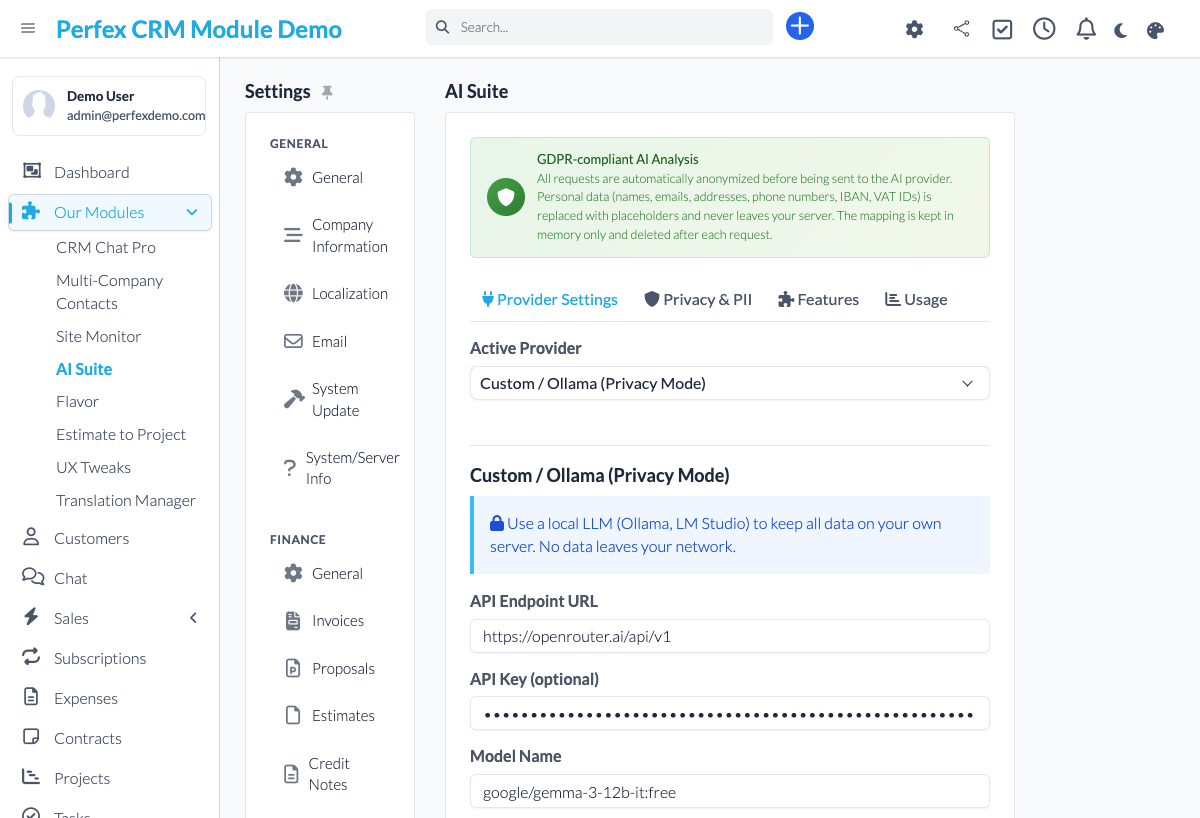
Configurar tu proveedor de IA
Ve a Configuración > AI Suite > Proveedor. Selecciona tu proveedor de IA (OpenAI, Claude, Gemini o Custom/OpenRouter), introduce tu clave de API y elige tu modelo. Para empezar gratis, elige Custom (OpenRouter), establece el modelo en nvidia/nemotron-3.5-lightning:free y activa "Disable reasoning (for JSON tasks)".
Instalar módulos add-on
Sube y activa los módulos add-on que necesites: AI Insights para Customer 360 y puntuación de leads, Revenue Forecast para predicciones de pipeline, Smart Documents para redacción de propuestas o Smart Tasks para priorización de tareas.
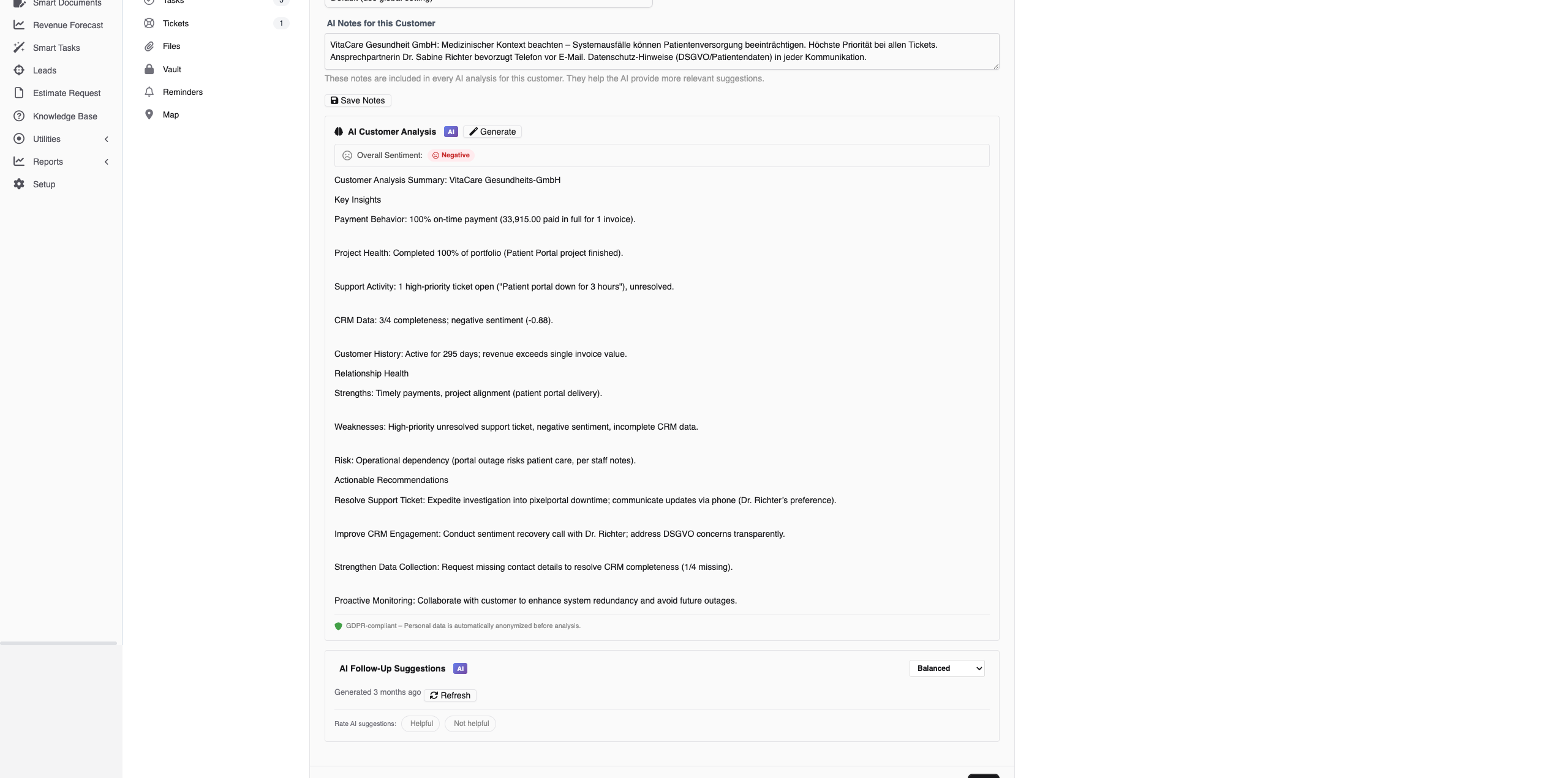
Try Customer 360 (AI Insights)
With the AI Insights add-on installed (included in the Starter bundle), open any client profile and click the AI tab. Click "Generate Analysis" to see a comprehensive Customer 360 with real-time streaming. The AI analyzes invoices, projects, tickets, and proposals to create actionable insights.
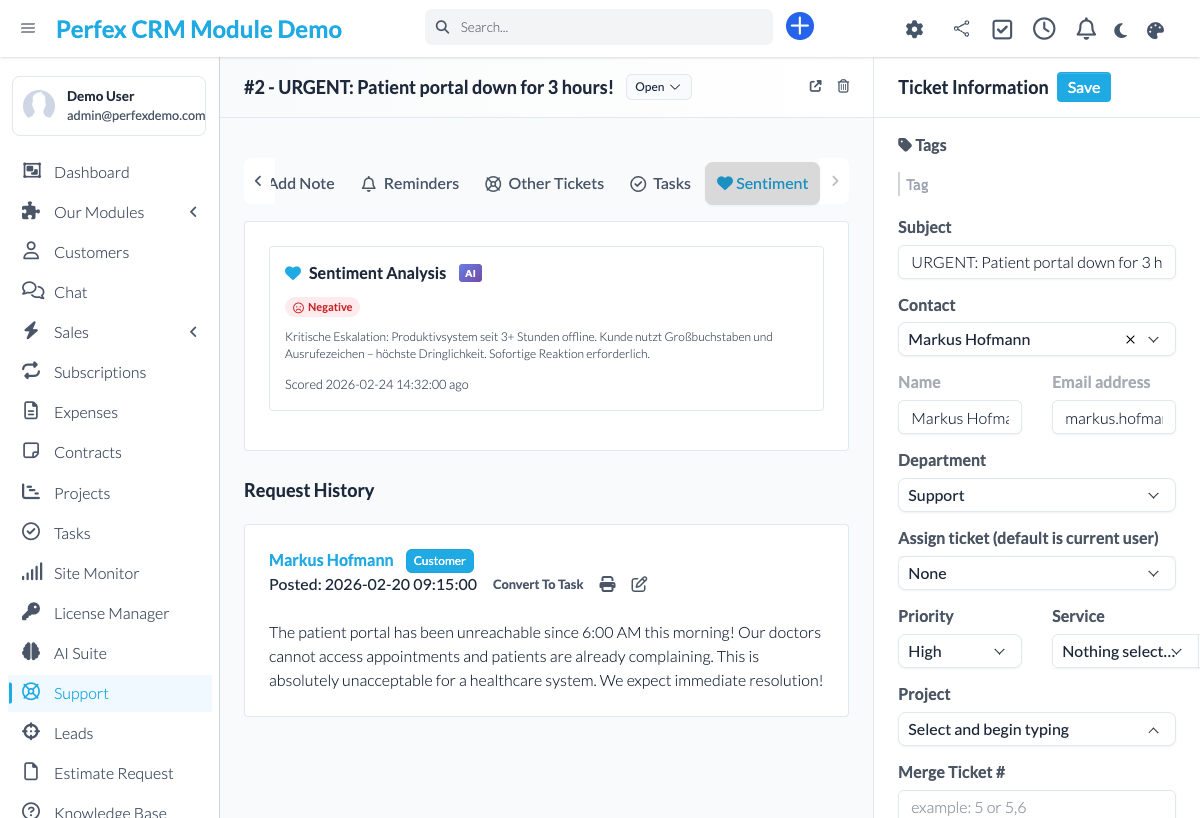
Analizar un ticket
Abre un ticket de soporte y usa las funciones de IA: Resumir para una vista rápida, Sentimiento para detección de ánimo, Sugerir respuesta para un borrador generado por IA o Reformular para mejorar tu respuesta escrita.
Configurar enrutamiento de modelos (opcional)
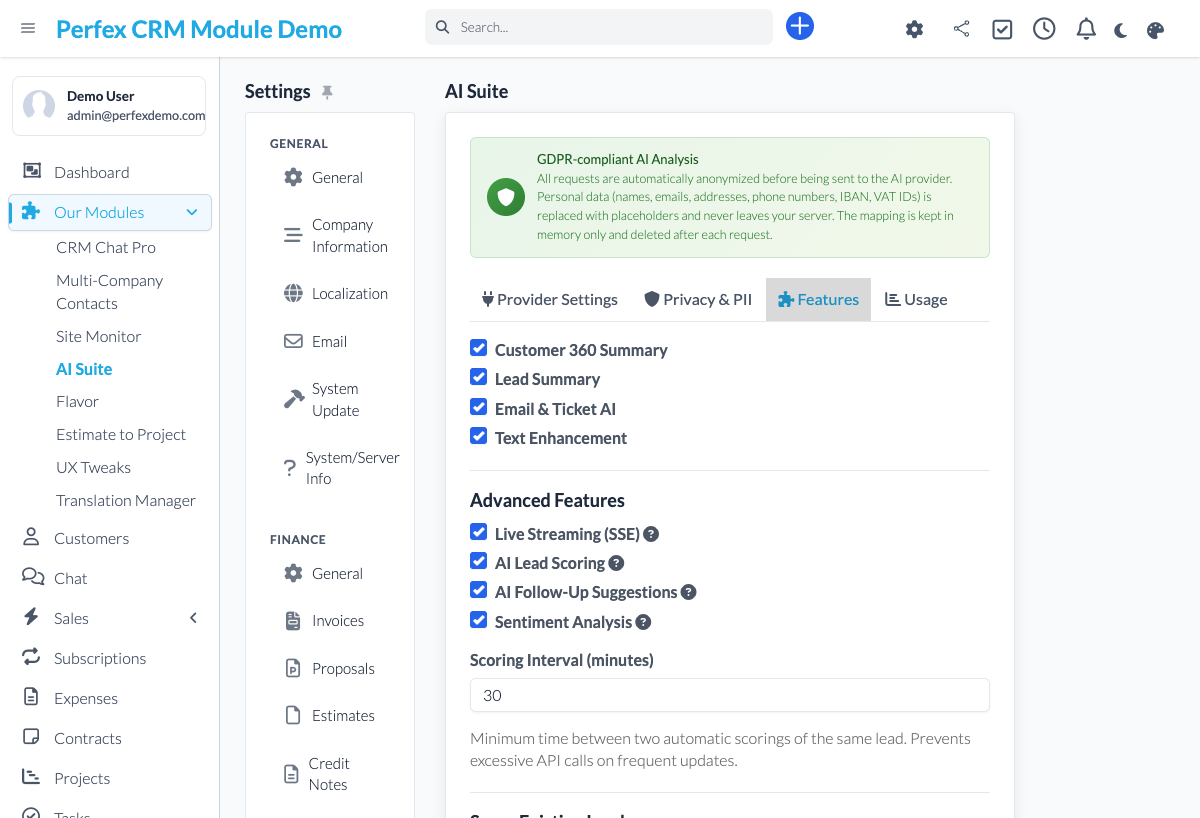
Para configuraciones avanzadas, ve a Configuración > AI Suite > Funciones para asignar diferentes modelos por función. Usa un modelo rápido para tareas simples (sentimiento, puntuación) y uno premium para las complejas (Customer 360, propuestas).
Download Diagnostics Report
If you need support, go to the module admin page and click the "Download Diagnostics" link. This generates a JSON file with system info, PHP version, installed modules, and recent errors (secrets are automatically redacted). Upload this file when creating a support ticket at custom-perfexcrm.com/support/ for faster troubleshooting.

Consejos y trucos
Aprovecha al máximo AI Suite con estos consejos.
Empieza gratis con NVIDIA Nemotron
Crea una cuenta gratuita en OpenRouter y usa un modelo gratuito de NVIDIA Nemotron (nvidia/nemotron-3.5-lightning:free) con "Disable reasoning" activada. Obtienes una IA capaz y respetuosa con la privacidad para cada función sin coste por token: ideal para probar antes de contratar un proveedor de pago.
Usa ajustes de tono por cliente
Configura diferentes tonos de comunicación para diferentes clientes. Un cliente corporativo puede necesitar lenguaje formal mientras que un fundador de startup prefiere informal. Ve a la pestaña IA del cliente para configurar el tono e instrucciones personalizadas.
Diferentes modelos, menor coste
No todas las funciones necesitan el modelo más caro. Usa un modelo rápido y económico (Gemini Flash) para análisis de sentimiento y puntuación de leads, y reserva los modelos premium (Claude, GPT-4) para Customer 360 y generación de propuestas.
Puntúa tus leads por lotes
Usa la función de puntuación por lotes para puntuar automáticamente todos los leads sin puntuación de una vez. Las puntuaciones aparecen como insignias de colores en tu tablero kanban para priorización visual instantánea.
Streaming en tiempo real para respuestas más rápidas
Customer 360 y el resumen de leads usan streaming en tiempo real. Ves la respuesta de la IA aparecer token a token, así puedes empezar a leer mientras el análisis se sigue generando.
Use diagnostics for faster support
When creating a support ticket, download and attach the diagnostics report from your module settings. It contains system info, PHP version, database details, and recent errors — all with secrets automatically redacted. This helps resolve your issue much faster.
Preguntas frecuentes
Is my data sent to external AI services?
Only to the AI provider you connect, using your own API key. Most AI actions run when you trigger them (e.g., analyzing a ticket or generating a Customer 360). With the AI Insights add-on, sentiment analysis runs automatically on new tickets, replies and notes, and lead scoring runs when a lead is created or changed. You can switch both off in the settings. Before any prompt leaves your server, AI Suite redacts personal data such as names, email addresses and phone numbers (on by default).
Can I use free AI models?
Yes - and at no per-token cost. With OpenRouter as your provider you can run every feature on free models. We recommend NVIDIA Nemotron (for example nvidia/nemotron-3.5-lightning:free) with the "Disable reasoning" option enabled - it is privacy-friendly, fast, and reliable for the JSON-based features. See our documentation for per-feature tips.
Does AI Suite work with Perfex CRM 3.x?
Yes. AI Suite is fully compatible with Perfex CRM 3.x and requires PHP 8.0 or higher. It is tested with every Perfex CRM release.
Which AI providers are supported?
AI Suite supports OpenAI (GPT-4o, GPT-4, o1), Anthropic Claude (Sonnet, Opus, Haiku), Google Gemini (2.5 Flash, Pro), and any OpenAI-compatible endpoint. This includes OpenRouter, which gives you access to 200+ models including free options.
What is Customer 360?
Customer 360 is a comprehensive AI analysis of each client. It examines invoices, projects, tickets, estimates, and proposals to generate insights about payment behavior, relationship health, revenue trends, risks, and actionable recommendations. Results stream in real time. Customer 360 is part of the AI Insights add-on and included in the Starter bundle.
How does per-feature model routing work?
You can assign different AI models to different features in Settings > AI Suite > Features. For example, use a fast cheap model for sentiment analysis, a mid-tier model for follow-up suggestions, and a premium model for Customer 360. You can even set different models per language.
How does the lead scoring work?
The AI analyzes lead data including source, status, communication history, and assigned value to generate a score from 0-100 with a hot/warm/cold label. Scores appear as badges on lead kanban cards and in the lead detail view. You can re-score individual leads or batch-score all unscored leads. Lead scoring is part of the AI Insights add-on and included in the Starter bundle.
What languages are supported?
AI Suite answers in the language configured in your Perfex CRM installation — any installed language works, from English, German, and French to Arabic, Chinese, and Japanese. Language-specific model routing lets you give each language its own model.
Is AI Suite GDPR compliant?
AI Suite is built with GDPR in mind. It uses your own API keys and redacts personal identifiers like names, email addresses and phone numbers before data is sent to the AI provider. The automatic features (sentiment analysis and lead scoring in AI Insights) can be switched off individually. AI results stay in your own Perfex database. Whether your setup is compliant also depends on the AI provider you choose and your agreement with them.
What are the AI Suite add-ons?
AI Suite has optional add-on modules that extend its capabilities: AI Insights (Customer 360, Lead Scoring, Sentiment, Follow-Ups), Revenue Forecast (AI pipeline forecasting from your CRM data), Smart Documents (AI proposal and estimate drafting), and Smart Tasks (AI task prioritization and workload analysis). Each add-on requires the AI Suite Core module. You can buy them individually or save with the Starter, Pro, and Complete bundles.
How actively is AI Suite maintained?
AI Suite is in active development and tested with every Perfex CRM release. The changelog on this site is public, so you can check the release history and update frequency before you buy. Updates are included with your license.
¿Necesitas más ayuda?
Contacta a nuestro equipo de soporte o visita la página del módulo para más información.