Documentation AI Suite
Tutoriel vidéo
Avec des chapitres cliquables — clique sur un chapitre pour y accéder directement.
Pour commencer
Suis ces étapes pour configurer AI Suite.
Installer AI Suite Core
Téléverse le fichier zip d'AI Suite via Configuration > Modules > Installer un nouveau module. Active le module et saisis ta clé de licence.

Configurer ton fournisseur IA
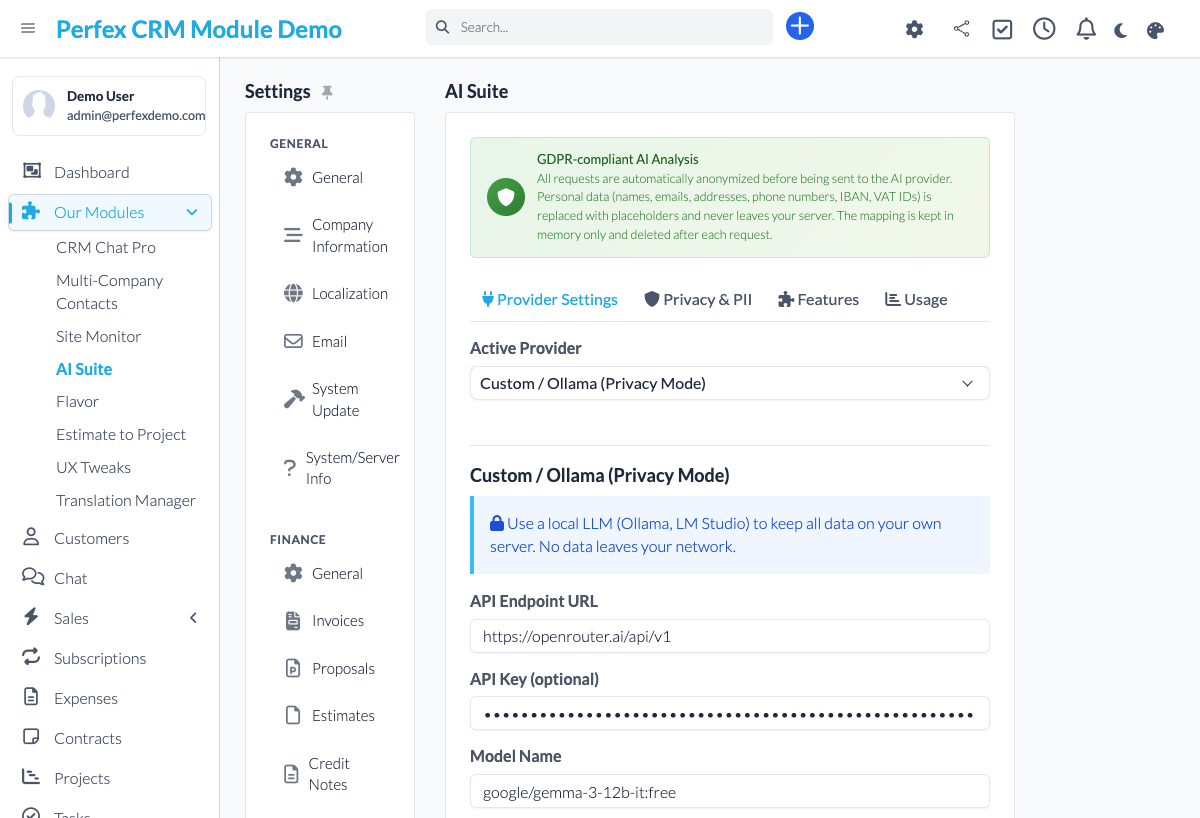
Va dans Configuration > AI Suite > Fournisseur. Sélectionne ton fournisseur IA (OpenAI, Claude, Gemini ou Personnalisé/OpenRouter), saisis ta clé API et choisis ton modèle. Pour démarrer gratuitement, choisis Personnalisé (OpenRouter), règle le modèle sur nvidia/nemotron-3.5-lightning:free et active "Disable reasoning (for JSON tasks)".
Installer les modules complémentaires
Téléverse et active les modules complémentaires dont tu as besoin : AI Insights pour Customer 360 et le scoring de leads, Revenue Forecast pour les prédictions de pipeline, Smart Documents pour la rédaction de propositions ou Smart Tasks pour la priorisation des tâches.
Try Customer 360 (AI Insights)
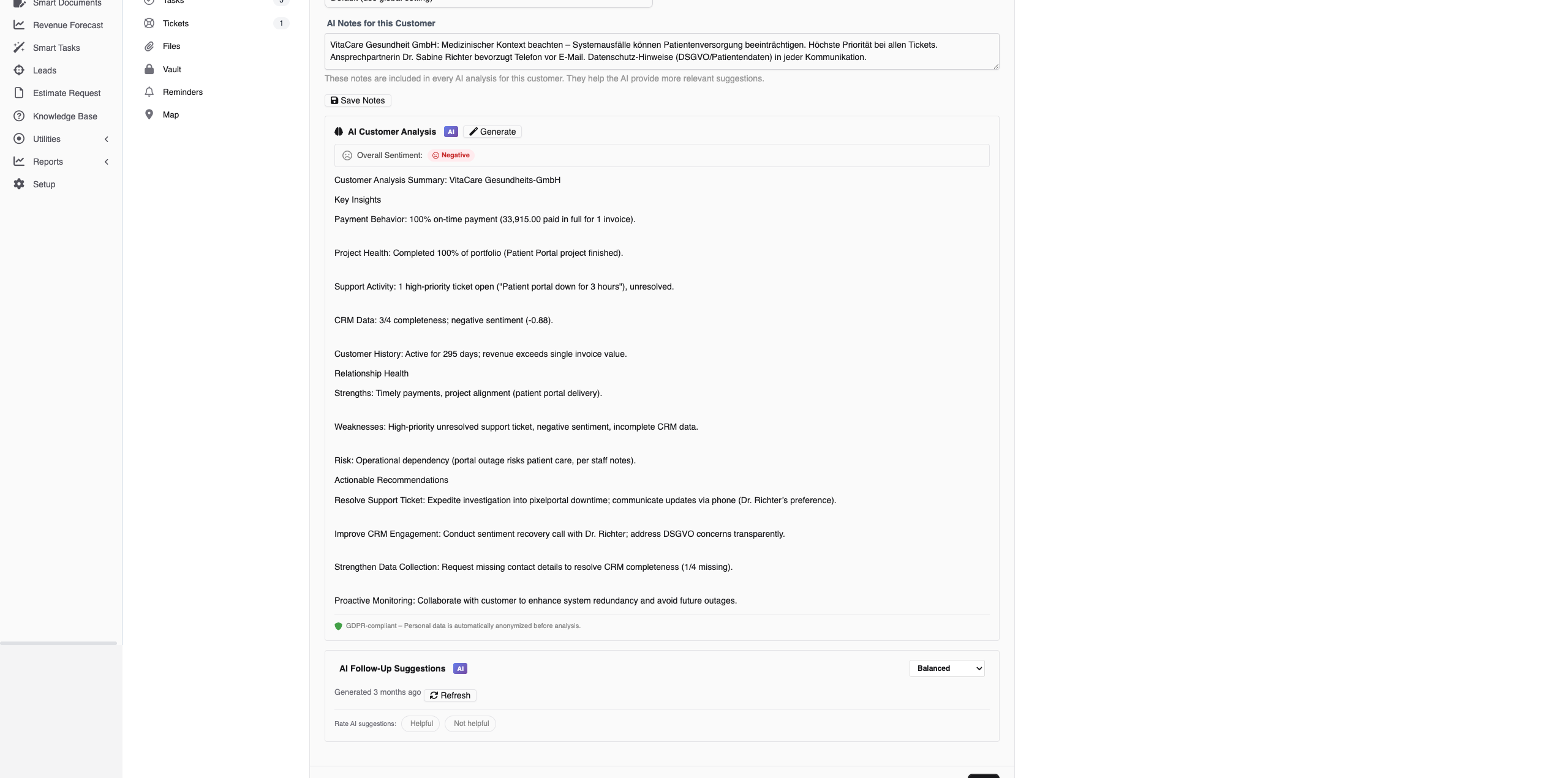
With the AI Insights add-on installed (included in the Starter bundle), open any client profile and click the AI tab. Click "Generate Analysis" to see a comprehensive Customer 360 with real-time streaming. The AI analyzes invoices, projects, tickets, and proposals to create actionable insights.
Analyser un ticket
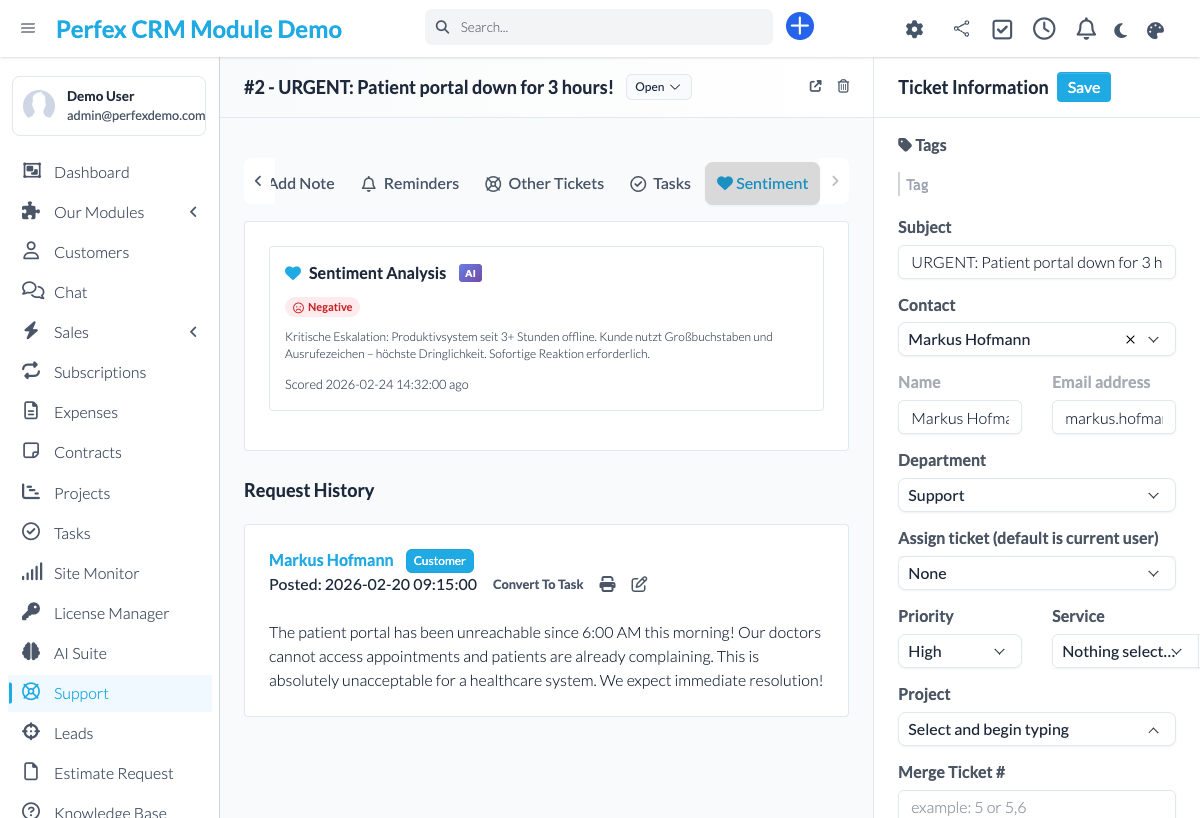
Ouvre un ticket de support et utilise les fonctionnalités IA : Résumer pour un aperçu rapide, Sentiment pour détecter l'humeur, Suggérer une réponse pour un brouillon IA ou Reformuler pour améliorer ta réponse écrite.
Configurer le routage de modèles (optionnel)
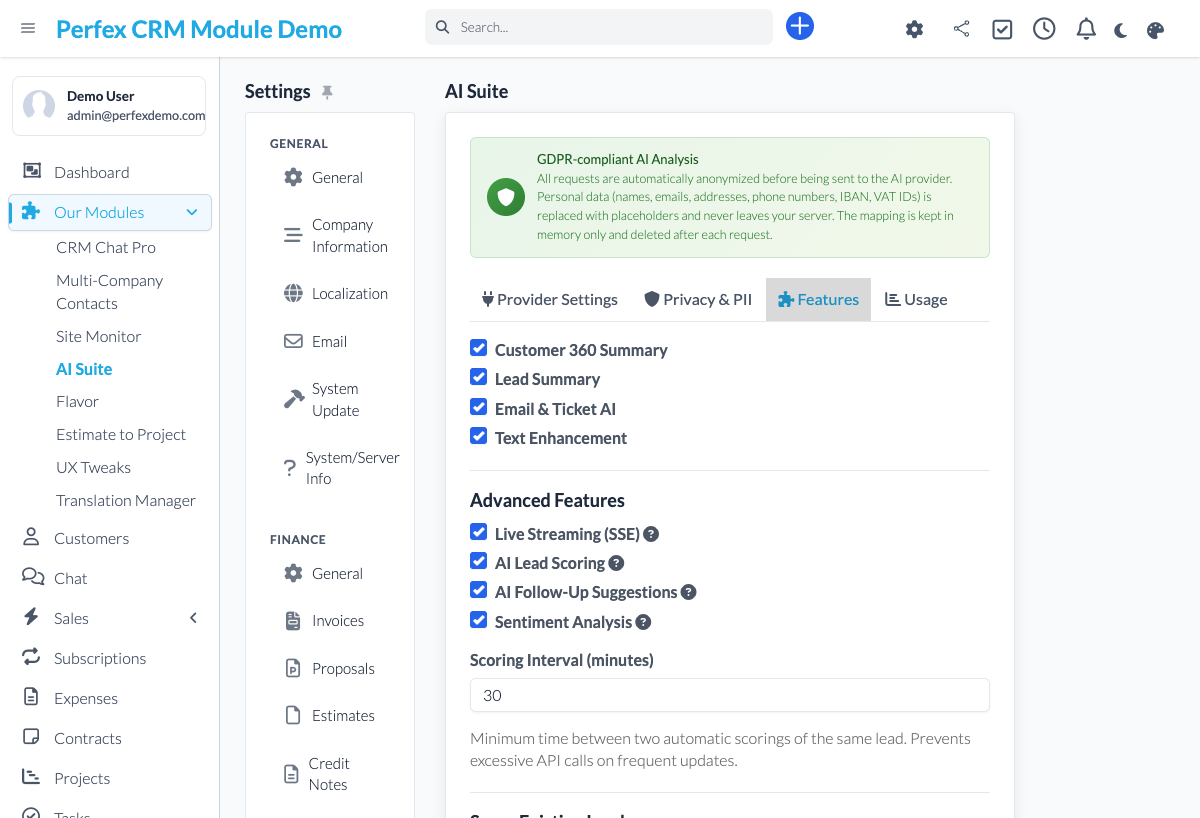
Pour les configurations avancées, va dans Configuration > AI Suite > Fonctionnalités pour assigner des modèles différents par fonctionnalité. Utilise un modèle rapide pour les tâches simples (sentiment, scoring) et un modèle premium pour les tâches complexes (Customer 360, propositions).
Download Diagnostics Report
If you need support, go to the module admin page and click the "Download Diagnostics" link. This generates a JSON file with system info, PHP version, installed modules, and recent errors (secrets are automatically redacted). Upload this file when creating a support ticket at custom-perfexcrm.com/support/ for faster troubleshooting.

Trucs et astuces
Tire le meilleur parti de AI Suite avec ces conseils.
Démarre gratuitement avec NVIDIA Nemotron
Crée un compte OpenRouter gratuit et utilise un modèle NVIDIA Nemotron gratuit (nvidia/nemotron-3.5-lightning:free) avec "Disable reasoning" activée. Tu obtiens une IA performante et respectueuse de la vie privée pour chaque fonctionnalité sans coût par token — idéal pour tester avant de t'engager avec un fournisseur payant.
Utilise les paramètres de ton par client
Définis différents tons de communication pour différents clients. Un client entreprise peut nécessiter un langage formel tandis qu'un fondateur de startup préfère l'informel. Va dans l'onglet IA du client pour configurer le ton et les instructions personnalisées.
Modèles différents, coûts réduits
Toutes les fonctionnalités n'ont pas besoin du modèle le plus cher. Utilise un modèle rapide et économique (Gemini Flash) pour l'analyse de sentiment et le scoring de leads, et réserve les modèles premium (Claude, GPT-4) pour Customer 360 et la génération de propositions.
Score tes leads en lot
Utilise la fonctionnalité de scoring en lot pour évaluer automatiquement tous les leads non scorés en une seule fois. Les scores apparaissent sous forme de badges colorés sur ton tableau kanban pour une priorisation visuelle instantanée.
Streaming en temps réel pour un retour plus rapide
Customer 360 et le résumé des leads utilisent le streaming en temps réel. Tu vois la réponse IA apparaître jeton par jeton, ce qui tu permet de commencer à lire les insights pendant que l'analyse est encore en cours.
Use diagnostics for faster support
When creating a support ticket, download and attach the diagnostics report from your module settings. It contains system info, PHP version, database details, and recent errors — all with secrets automatically redacted. This helps resolve your issue much faster.
Questions fréquentes
Is my data sent to external AI services?
Only when you explicitly trigger an AI action (e.g., analyze a ticket or generate a Customer 360). No data is sent automatically. AI Suite also features automatic PII redaction that removes personal data before sending prompts to the AI provider.
Can I use free AI models?
Yes - and at no per-token cost. With OpenRouter as your provider you can run every feature on free models. We recommend NVIDIA Nemotron (for example nvidia/nemotron-3.5-lightning:free) with the "Disable reasoning" option enabled - it is privacy-friendly, fast, and reliable for the JSON-based features. See our documentation for per-feature tips.
Does AI Suite work with Perfex CRM 3.x?
Yes. AI Suite is fully compatible with Perfex CRM 3.x and requires PHP 8.0 or higher. It is tested with every Perfex CRM release.
Which AI providers are supported?
AI Suite supports OpenAI (GPT-4o, GPT-4, o1), Anthropic Claude (Sonnet, Opus, Haiku), Google Gemini (2.5 Flash, Pro), and any OpenAI-compatible endpoint. This includes OpenRouter, which gives you access to 200+ models including free options.
What is Customer 360?
Customer 360 is a comprehensive AI analysis of each client. It examines invoices, projects, tickets, estimates, and proposals to generate insights about payment behavior, relationship health, revenue trends, risks, and actionable recommendations. Results stream in real time. Customer 360 is part of the AI Insights add-on and included in the Starter bundle.
How does per-feature model routing work?
You can assign different AI models to different features in Settings > AI Suite > Features. For example, use a fast cheap model for sentiment analysis, a mid-tier model for follow-up suggestions, and a premium model for Customer 360. You can even set different models per language.
How does the lead scoring work?
The AI analyzes lead data including source, status, communication history, and assigned value to generate a score from 0-100 with a hot/warm/cold label. Scores appear as badges on lead kanban cards and in the lead detail view. You can re-score individual leads or batch-score all unscored leads. Lead scoring is part of the AI Insights add-on and included in the Starter bundle.
What languages are supported?
AI Suite answers in the language configured in your Perfex CRM installation — any installed language works, from English, German, and French to Arabic, Chinese, and Japanese. Language-specific model routing lets you give each language its own model.
Is AI Suite GDPR compliant?
AI Suite is built with GDPR in mind. All AI processing is triggered manually, uses your own API keys, and features automatic PII redaction. Personal identifiers like names, emails, and phone numbers are removed before data is sent to the AI provider. No data is stored beyond what Perfex CRM already stores.
What are the AI Suite add-ons?
AI Suite has optional add-on modules that extend its capabilities: AI Insights (Customer 360, Lead Scoring, Sentiment, Follow-Ups), Revenue Forecast (AI pipeline forecasting from your CRM data), Smart Documents (AI proposal and estimate drafting), and Smart Tasks (AI task prioritization and workload analysis). Each add-on requires the AI Suite Core module. You can buy them individually or save with the Starter, Pro, and Complete bundles.
How actively is AI Suite maintained?
AI Suite is in active development and tested with every Perfex CRM release. The changelog on this site is public, so you can check the release history and update frequency before you buy. Updates are included with your license.
Besoin d'aide ?
Contacte notre équipe de support ou visite la page du module.